Using Reference Images Effectively
Reference images play an important role in keeping visual generation consistent and intentional. They act as visual anchors that guide the model when creating characters, environments, scenes, and shots. When used thoughtfully, references help the system understand what should remain stable across generations and what can evolve.
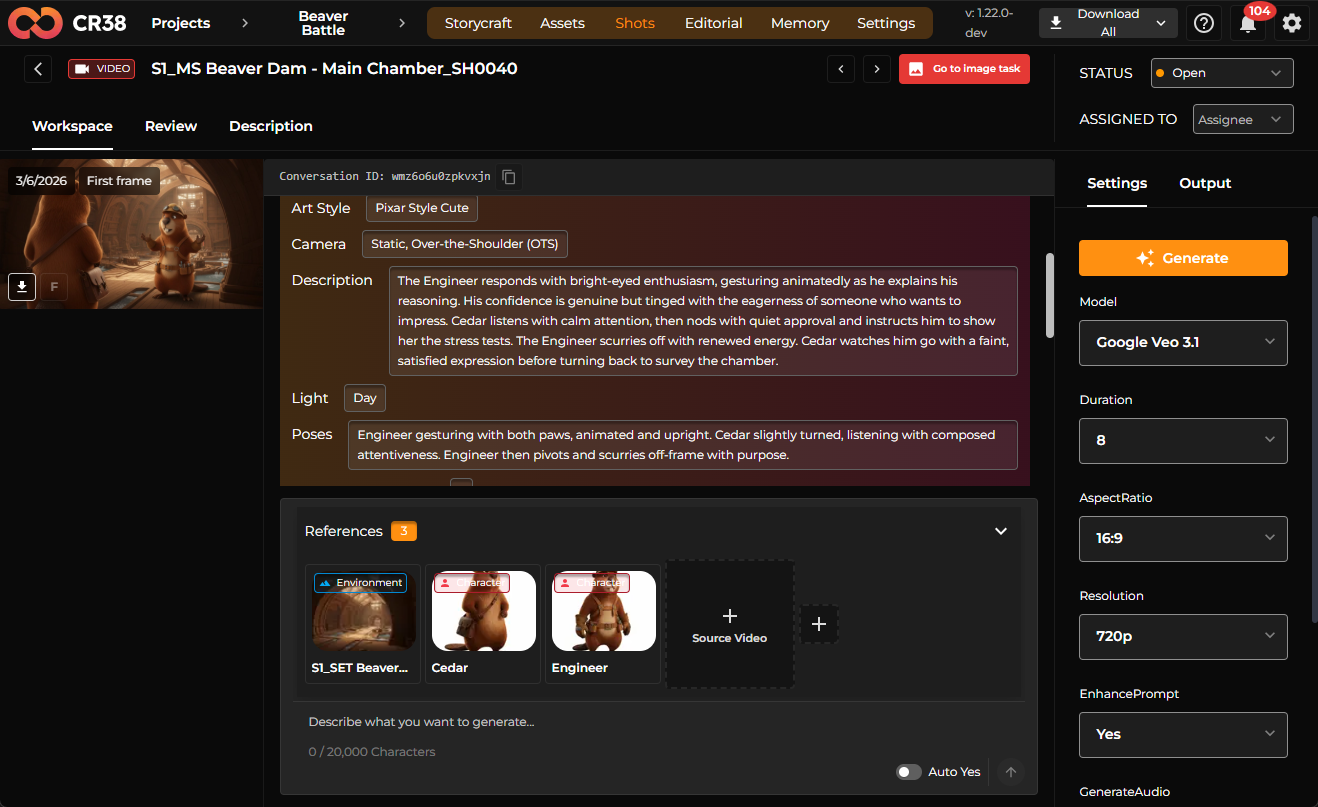
This guide explains how to choose, label, and reuse reference images so they support your workflow instead of complicating it.
What Reference Images Are Used For
A reference image is a visual example that the system can use as context during generation. Instead of relying only on text prompts, the model can interpret visual information such as composition, lighting, style, and character appearance directly from an image.
References are commonly used for:
- defining a character’s appearance
- establishing an environment or location
- maintaining visual continuity between scenes
- guiding framing, lighting, or style
For example, once a character image has been generated and approved, it can be attached as a reference. Later scenes that include that character can automatically use this reference to maintain visual consistency.
Choosing Good Reference Images
The most effective references are clear, focused, and representative of what you want the system to reproduce. A good reference should communicate a single visual idea rather than several competing ones.
When selecting a reference, prioritize images that clearly show the important elements. For characters, this might mean a full-body view or a well-lit portrait that clearly defines clothing and proportions. For environments, choose images that represent the mood, lighting, and spatial composition of the scene.
In practice, references often come from generated results. When the system produces several options, it is common to select the strongest one and promote it to a reference. That reference then becomes the visual foundation for future generations.
Adding References During Iteration
References are rarely perfect on the first pass. A typical workflow involves generating multiple options, reviewing them, and then selecting one to reuse as a reference.
Once an image is selected, it can be attached to the working card (for example, a character or environment). From that point on, further generations can use that reference to refine or adjust the result while preserving its core visual qualities.
This iterative process helps narrow the visual direction gradually. Instead of repeatedly describing the same details in prompts, the reference image carries that information forward automatically.
Labeling and Organizing References
Clear labeling makes references much easier to reuse later in the workflow. When references are attached to characters, locations, or scenes, they should represent a stable concept rather than a temporary experiment.
For example:
- A character reference should consistently represent that character’s appearance.
- A location reference should represent the environment used across multiple shots.
- A shot reference may define framing or composition for a particular moment.
Well-organized references reduce confusion and allow the system to automatically attach them when scenes or shots are generated.
Reusing References Across Scenes
One of the main advantages of references is continuity. Once characters or environments exist as references, the system can automatically include them in scenes that require them.
For example, if a scene includes a specific character and location, the generation process can automatically add those references to the prompt. This ensures that new images remain visually connected to earlier ones.
In many workflows, the first successful image becomes the visual base for everything that follows. Later images are generated with that reference so the world, characters, and atmosphere remain coherent.
References in Scene and Shot Generation
References are not limited to character creation. They are also used when generating scenes and shots.
A scene may include references for:
- environment or location
- characters present in the scene
- previously generated images that define the visual direction
For example, a generated environment image can later be used as a location reference when generating the first frame of a shot. This helps ensure the framing, lighting, and atmosphere remain consistent with the established setting.
In production workflows, this continuity is essential. The first frame of a shot often becomes the foundation for generating the video or animation that follows.
Improving Results with References
References can significantly improve generation quality when combined with clear prompts and appropriate models. More capable models tend to follow references more precisely, reproduce details better, and match the intended style more closely.
However, references are still part of an iterative process. If the generated result is not satisfactory, you can adjust the prompt, change the model, or introduce additional references to refine the outcome.
Over time, your project should accumulate a stable set of references for characters, environments, and scenes. These assets become the visual backbone of the production.
Summary
Reference images provide the visual memory of your project. They allow the system to maintain consistency, reuse established visuals, and build complex scenes from previously approved elements.
The most effective workflows treat references as evolving assets. You generate options, choose the strongest example, attach it as a reference, and continue building from it. As references accumulate, the system becomes better at producing images that match your intended style, characters, and environments.